How to upload your existing world.
Note: Make sure the server is set to the same version as when the world was generated
Login to the server via SFTP, you can follow our guide HERE
Once logged in, access your 7 Days to Die appdata on your PC:
'%AppData%\Roaming\7DaysToDie'
Upload the 'Saves' folder to '.local/share/7DaysToDie'
If it's a Random Generated World, upload the 'GeneratedWorlds' folder as well to '.local/share/7DaysToDie'
In the 'serverconfig.xml':
Look for the '<!-- World -->' section and change the following: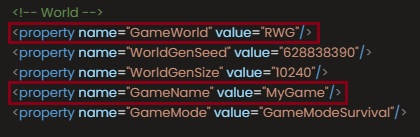
Gameworld should be the same as the name of the region of your world.
e.g. West Zefaheso Mountains.
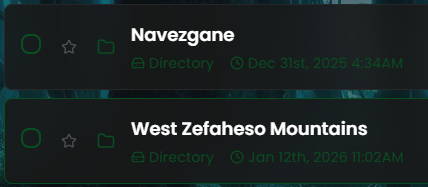
Gamename should be the same as the name of the World you created.
Start the server afterwards and it should load your uploaded world.